
Hire me
Pooyan Razian

AWS Lambda SnapStart

AWS Lambda SnapStart
Published: February 7, 2025

AWS Lambda SnapStart

Here is the Lambda execution environment lifecycle:

Lambda execution environment lifecycle
Source

Each phase starts with an event that Lambda sends to the runtime and to all registered extensions. The runtime and each extension indicate completion by sending a Next API request. Lambda freezes the execution environment when the runtime and each extension have completed and there are no pending events.

And this illustrates latency during the cold start:
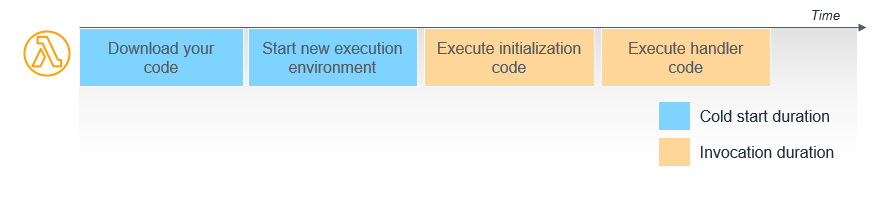
Cold start latency
Source

SnapStart is a feature that optimizes the initialization phase by taking a snapshot of the function's execution environment after initialization is complete. When a new invocation occurs, Lambda restores the snapshot, allowing the function to be invoked immediately without reinitialization.
This approach significantly reduces the cold start latency that can affect performance-sensitive applications.

Currently, it is available for newer versions of Java/Python/.NET-based runtimes, and other managed runtimes (such as nodejs22.x and ruby3.3), OS-only runtimes, and container images are not supported yet.

Activating SnapStart

To enable SnapStart for your Lambda function, follow these steps:

Using the AWS Management Console:

  • Navigate to the AWS Lambda console.
  • Select your function.
  • Go to the Configuration tab and choose General configuration.

Click Edit, set SnapStart to Published versions, and save the changes.

  • Publish a new version of your function.

Using the AWS CLI:

Run the following commands to enable SnapStart for your function:

aws lambda update-function-configuration --function-name my-function --snap-start ApplyOn=PublishedVersions
aws lambda publish-version --function-name my-function

Replace my-function with your function's name. After publishing, SnapStart will be active for that version.

Maintaining Uniqueness with SnapStart

Since SnapStart restores functions from a snapshot, any unique data generated during initialization (like unique IDs or random numbers) will be duplicated across invocations. To ensure uniqueness:

  • Generate unique data within the function handler, not during initialization.

Use cryptographically secure random number generators (CSPRNGs) to maintain randomness.

Example #1 in Python:

In this example, a unique ID is generated each time the function is invoked, ensuring uniqueness across invocations.

import json
import random
import time

unique_number = None

def lambda_handler(event, context):
  seed = int(time.time() * 1000)
  random.seed(seed)
  global unique_number
  if not unique_number:
    unique_number = random.randint(1, 10000)

  print("Unique number: ", unique_number)

  return "Hello, World!"

Example #2 in Python:

Or, you can use a CSPRNG to generate random numbers securely:

import json
import random

secure_rng = random.SystemRandom()

def lambda_handler(event, context):
  random_numbers = [secure_rng.random() for _ in range(10)]

  for number in random_numbers:
    print(number)

  return "Hello, World!"

Using Runtime Hooks in Python

AWS provides runtime hooks that allow you to execute code at specific points during the snapshot lifecycle:

@register_before_snapshot: Runs code before the snapshot is taken.

@register_after_restore: Runs code after the snapshot is restored.

Example:

from snapshot_restore_py import register_before_snapshot, register_after_restore

@register_before_snapshot
def before_snapshot():
  # Code to run before snapshot
  print("Running before snapshot")

@register_after_restore
def after_restore():
  # Code to run after restore
  print("Running after restore")

def lambda_handler(event, context):
  print("Handler execution")
  # Your handler logic here

This setup ensures that specific code runs at the appropriate stages of the snapshot lifecycle.

Monitoring SnapStart Functions

Monitoring is crucial to ensure your SnapStart-enabled functions perform as expected. You can use Amazon CloudWatch and AWS X-Ray for this purpose.

CloudWatch Logs:

CloudWatch provides logs for both initialization and invocation phases. For SnapStart functions, you'll see an INIT_REPORT log entry detailing the initialization duration.

X-Ray Tracing:

With X-Ray, you can trace requests to your functions. In SnapStart functions, the Restore subsegment indicates the time taken to restore the snapshot and execute any after-restore hooks.

Security Considerations

SnapStart supports encryption at rest. By default, AWS Lambda encrypts snapshots using an AWS managed KMS key. If you prefer, you can specify a customer-managed KMS key during function configuration:

aws lambda update-function-configuration --function-name my-function --kms-key-arn arn:aws:kms:region:account-id:key/key-id

Replace my-function with your function's name and provide the appropriate KMS key ARN.

Best Practices for Optimal Performance

To get the most out of SnapStart:

  • Preload dependencies and initialize resources during the initialization phase to reduce latency during invocation.
  • Organize your code efficiently, ensuring that heavy computational tasks are handled during initialization.
  • Use runtime hooks to manage tasks that need to occur before snapshotting or after restoring.

Example in Python:

# Import all dependencies outside of Lambda handler
from snapshot_restore_py import register_before_snapshot
import boto3
import pandas
import pydantic

# Create S3 and SSM clients outside of Lambda handler
s3_client = boto3.client("s3")

# Register the function to be called before snapshot
@register_before_snapshot
def download_llm_models():
  # Download an object from S3 and save to tmp
  # This files will persist in this snapshot
  with open('/tmp/FILE_NAME', 'wb') as f:
    s3_client.download_fileobj('amzn-s3-demo-bucket', 'OBJECT_NAME', f)
  ...

def lambda_handler(event, context):
  ...

By preloading data during initialization, you reduce the time spent fetching resources during invocation, leading to better performance.

Conclusion

SnapStart is a powerful feature that significantly reduces cold start latency for AWS Lambda functions. By taking a snapshot of the function's execution environment after initialization, SnapStart allows functions to be invoked immediately without reinitialization. This feature is available for newer versions of Java/Python/.NET-based runtimes and can be enabled through the AWS Management Console or CLI. To maintain uniqueness, generate unique data within the function handler and use CSPRNGs for randomness. Runtime hooks can be used to execute code at specific points during the snapshot lifecycle. Monitoring with CloudWatch and X-Ray is essential to ensure optimal performance, and security considerations include encryption at rest. By following best practices and optimizing your code, you can leverage SnapStart to enhance the performance of your Lambda functions. Remember, SnapStart will not boost startup time if the function is already warm, and might not be as effective for functions that are invoked infrequently.

If you liked the article, feel free to share it with your friends, family, or colleagues. You can also follow me on Medium or LinkedIn.

Copyright & Disclaimer

  • All content provided on this article is for informational and educational purposes only. The author makes no representations as to the accuracy or completeness of any information on this site or found by following any link on this site.
  • All the content is copyrighted, except the assets and content I have referenced to other people's work, and may not be reproduced on other websites, blogs, or social media. You are not allowed to reproduce, summarize to create derivative work, or use any content from this website under your name. This includes creating a similar article or summary based on AI/GenAI. For educational purposes, you may refer to parts of the content, and only refer, but you must provide a link back to the original article on this website. This is allowed only if your content is less than 10% similar to the original article.
  • While every care has been taken to ensure the accuracy of the content of this website, I make no representation as to the accuracy, correctness, or fitness for any purpose of the site content, nor do I accept any liability for loss or damage (including consequential loss or damage), however, caused, which may be incurred by any person or organization from reliance on or use of information on this site.
  • The contents of this article should not be construed as legal advice.
  • Opinions are my own and not the views of my employer.
  • English is not my mother-tongue language, so even though I try my best to express myself correctly, there might be a chance of miscommunication.
  • Links or references to other websites, including the use of information from 3rd-parties, are provided for the benefit of people who use this website. I am not responsible for the accuracy of the content on the websites that I have put a link to and I do not endorse any of those organizations or their contents.
  • If you have any queries or if you believe any information on this article is inaccurate, or if you think any of the assets used in this article are in violation of copyright, please contact me and let me know.

AWS Lambda SnapStart

AWS Lambda SnapStart
Published: February 7, 2025

AWS Lambda SnapStart

Here is the Lambda execution environment lifecycle:

Lambda execution environment lifecycle
Source

Each phase starts with an event that Lambda sends to the runtime and to all registered extensions. The runtime and each extension indicate completion by sending a Next API request. Lambda freezes the execution environment when the runtime and each extension have completed and there are no pending events.

And this illustrates latency during the cold start:

Cold start latency
Source

SnapStart is a feature that optimizes the initialization phase by taking a snapshot of the function's execution environment after initialization is complete. When a new invocation occurs, Lambda restores the snapshot, allowing the function to be invoked immediately without reinitialization.
This approach significantly reduces the cold start latency that can affect performance-sensitive applications.

Currently, it is available for newer versions of Java/Python/.NET-based runtimes, and other managed runtimes (such as nodejs22.x and ruby3.3), OS-only runtimes, and container images are not supported yet.

Activating SnapStart

To enable SnapStart for your Lambda function, follow these steps:

Using the AWS Management Console:

  • Navigate to the AWS Lambda console.
  • Select your function.
  • Go to the Configuration tab and choose General configuration.

Click Edit, set SnapStart to Published versions, and save the changes.

  • Publish a new version of your function.

Using the AWS CLI:

Run the following commands to enable SnapStart for your function:

aws lambda update-function-configuration --function-name my-function --snap-start ApplyOn=PublishedVersions
aws lambda publish-version --function-name my-function

Replace my-function with your function's name. After publishing, SnapStart will be active for that version.

Maintaining Uniqueness with SnapStart

Since SnapStart restores functions from a snapshot, any unique data generated during initialization (like unique IDs or random numbers) will be duplicated across invocations. To ensure uniqueness:

  • Generate unique data within the function handler, not during initialization.

Use cryptographically secure random number generators (CSPRNGs) to maintain randomness.

Example #1 in Python:

In this example, a unique ID is generated each time the function is invoked, ensuring uniqueness across invocations.

import json
import random
import time

unique_number = None

def lambda_handler(event, context):
  seed = int(time.time() * 1000)
  random.seed(seed)
  global unique_number
  if not unique_number:
    unique_number = random.randint(1, 10000)

  print("Unique number: ", unique_number)

  return "Hello, World!"

Example #2 in Python:

Or, you can use a CSPRNG to generate random numbers securely:

import json
import random

secure_rng = random.SystemRandom()

def lambda_handler(event, context):
  random_numbers = [secure_rng.random() for _ in range(10)]

  for number in random_numbers:
    print(number)

  return "Hello, World!"

Using Runtime Hooks in Python

AWS provides runtime hooks that allow you to execute code at specific points during the snapshot lifecycle:

@register_before_snapshot: Runs code before the snapshot is taken.

@register_after_restore: Runs code after the snapshot is restored.

Example:

from snapshot_restore_py import register_before_snapshot, register_after_restore

@register_before_snapshot
def before_snapshot():
  # Code to run before snapshot
  print("Running before snapshot")

@register_after_restore
def after_restore():
  # Code to run after restore
  print("Running after restore")

def lambda_handler(event, context):
  print("Handler execution")
  # Your handler logic here

This setup ensures that specific code runs at the appropriate stages of the snapshot lifecycle.

Monitoring SnapStart Functions

Monitoring is crucial to ensure your SnapStart-enabled functions perform as expected. You can use Amazon CloudWatch and AWS X-Ray for this purpose.

CloudWatch Logs:

CloudWatch provides logs for both initialization and invocation phases. For SnapStart functions, you'll see an INIT_REPORT log entry detailing the initialization duration.

X-Ray Tracing:

With X-Ray, you can trace requests to your functions. In SnapStart functions, the Restore subsegment indicates the time taken to restore the snapshot and execute any after-restore hooks.

Security Considerations

SnapStart supports encryption at rest. By default, AWS Lambda encrypts snapshots using an AWS managed KMS key. If you prefer, you can specify a customer-managed KMS key during function configuration:

aws lambda update-function-configuration --function-name my-function --kms-key-arn arn:aws:kms:region:account-id:key/key-id

Replace my-function with your function's name and provide the appropriate KMS key ARN.

Best Practices for Optimal Performance

To get the most out of SnapStart:

  • Preload dependencies and initialize resources during the initialization phase to reduce latency during invocation.
  • Organize your code efficiently, ensuring that heavy computational tasks are handled during initialization.
  • Use runtime hooks to manage tasks that need to occur before snapshotting or after restoring.

Example in Python:

# Import all dependencies outside of Lambda handler
from snapshot_restore_py import register_before_snapshot
import boto3
import pandas
import pydantic

# Create S3 and SSM clients outside of Lambda handler
s3_client = boto3.client("s3")

# Register the function to be called before snapshot
@register_before_snapshot
def download_llm_models():
  # Download an object from S3 and save to tmp
  # This files will persist in this snapshot
  with open('/tmp/FILE_NAME', 'wb') as f:
    s3_client.download_fileobj('amzn-s3-demo-bucket', 'OBJECT_NAME', f)
  ...

def lambda_handler(event, context):
  ...

By preloading data during initialization, you reduce the time spent fetching resources during invocation, leading to better performance.

Conclusion

SnapStart is a powerful feature that significantly reduces cold start latency for AWS Lambda functions. By taking a snapshot of the function's execution environment after initialization, SnapStart allows functions to be invoked immediately without reinitialization. This feature is available for newer versions of Java/Python/.NET-based runtimes and can be enabled through the AWS Management Console or CLI. To maintain uniqueness, generate unique data within the function handler and use CSPRNGs for randomness. Runtime hooks can be used to execute code at specific points during the snapshot lifecycle. Monitoring with CloudWatch and X-Ray is essential to ensure optimal performance, and security considerations include encryption at rest. By following best practices and optimizing your code, you can leverage SnapStart to enhance the performance of your Lambda functions. Remember, SnapStart will not boost startup time if the function is already warm, and might not be as effective for functions that are invoked infrequently.

If you liked the article, feel free to share it with your friends, family, or colleagues. You can also follow me on Medium or LinkedIn.

Copyright & Disclaimer

  • All content provided on this article is for informational and educational purposes only. The author makes no representations as to the accuracy or completeness of any information on this site or found by following any link on this site.
  • All the content is copyrighted, except the assets and content I have referenced to other people's work, and may not be reproduced on other websites, blogs, or social media. You are not allowed to reproduce, summarize to create derivative work, or use any content from this website under your name. This includes creating a similar article or summary based on AI/GenAI. For educational purposes, you may refer to parts of the content, and only refer, but you must provide a link back to the original article on this website. This is allowed only if your content is less than 10% similar to the original article.
  • While every care has been taken to ensure the accuracy of the content of this website, I make no representation as to the accuracy, correctness, or fitness for any purpose of the site content, nor do I accept any liability for loss or damage (including consequential loss or damage), however, caused, which may be incurred by any person or organization from reliance on or use of information on this site.
  • The contents of this article should not be construed as legal advice.
  • Opinions are my own and not the views of my employer.
  • English is not my mother-tongue language, so even though I try my best to express myself correctly, there might be a chance of miscommunication.
  • Links or references to other websites, including the use of information from 3rd-parties, are provided for the benefit of people who use this website. I am not responsible for the accuracy of the content on the websites that I have put a link to and I do not endorse any of those organizations or their contents.
  • If you have any queries or if you believe any information on this article is inaccurate, or if you think any of the assets used in this article are in violation of copyright, please contact me and let me know.
Copyright © 2025 - pooyan.info