Hire me
Pooyan Razian

Amazon CloudWatch now supports dashboard variables

Amazon CloudWatch now supports dashboard variables
Published: June 29, 2023

AWS announced on Friday that now you can specify and use variables for aggregated metrics in Amazon CloudWatch Dashboards. This was one of the long-awaited features most of us were waiting for.

Now you can navigate between different views projecting different data sets for the same resource. You can read more about it here, here, and here. You can also follow the steps specified in this example.

A quick test

I did a quick manual test to see how it works. You can probably also use this new feature in CDK, CloudFormation, and Pulumi, but I haven't tested them yet.

  • Open CloudWatch Dashboard
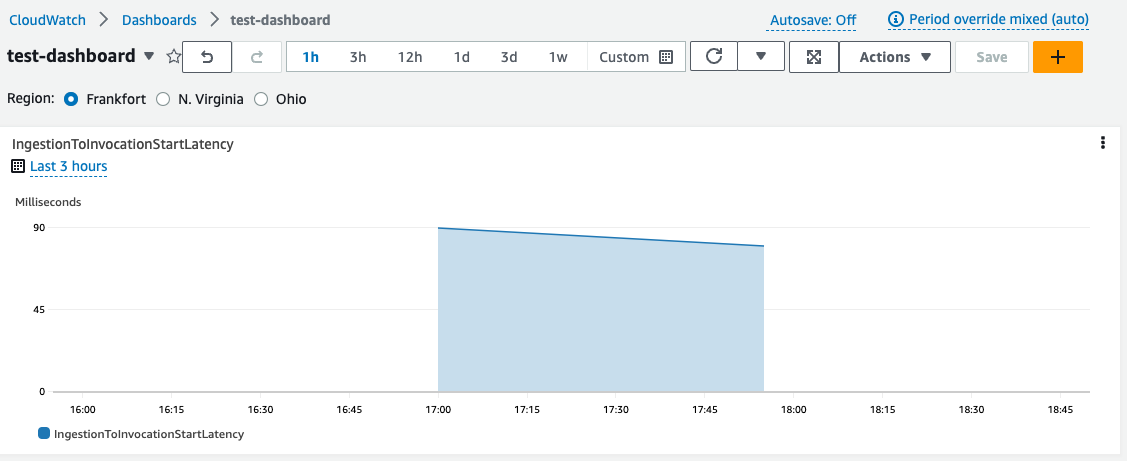
  • Create a new test dashboard with a test widget
  • Click on "Actions" > "Variables" > "Create a variable"
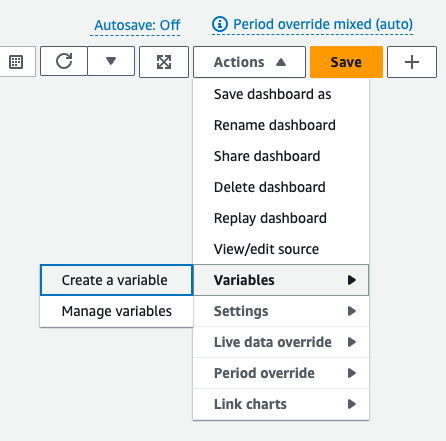
AWS Cloudwatch Dashboard action create a variable
  • Create a variable, for example like this:
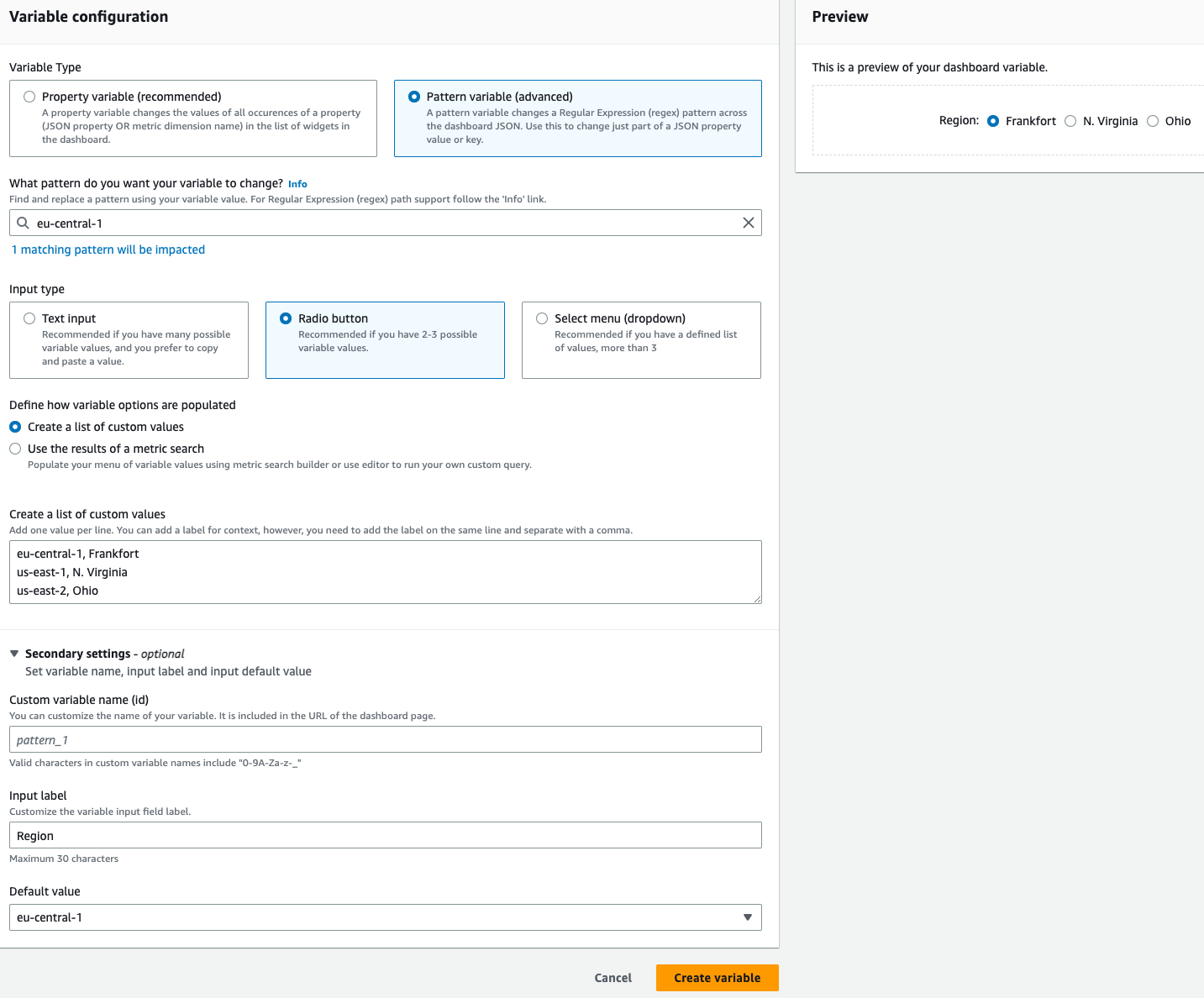
AWS Cloudwatch Dashboard create a variable
  • Then you should be able to see the variable
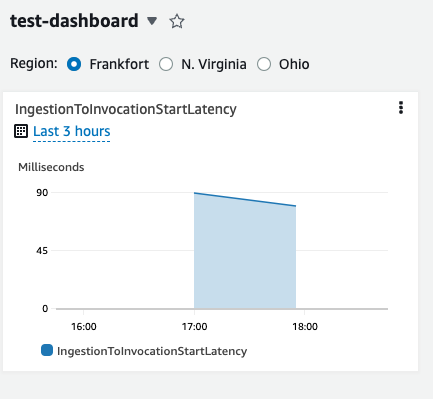
AWS Cloudwatch Dashboard widget with a variable

If you liked the article, feel free to share it with your friends, family, or colleagues. You can also follow me on Medium or LinkedIn.

Copyright & Disclaimer

  • All content provided on this article is for informational and educational purposes only. The author makes no representations as to the accuracy or completeness of any information on this site or found by following any link on this site.
  • All the content is copyrighted, except the assets and content I have referenced to other people's work, and may not be reproduced on other websites, blogs, or social media. You are not allowed to reproduce, summarize to create derivative work, or use any content from this website under your name. This includes creating a similar article or summary based on AI/GenAI. For educational purposes, you may refer to parts of the content, and only refer, but you must provide a link back to the original article on this website. This is allowed only if your content is less than 10% similar to the original article.
  • While every care has been taken to ensure the accuracy of the content of this website, I make no representation as to the accuracy, correctness, or fitness for any purpose of the site content, nor do I accept any liability for loss or damage (including consequential loss or damage), however, caused, which may be incurred by any person or organization from reliance on or use of information on this site.
  • The contents of this article should not be construed as legal advice.
  • Opinions are my own and not the views of my employer.
  • English is not my mother-tongue language, so even though I try my best to express myself correctly, there might be a chance of miscommunication.
  • Links or references to other websites, including the use of information from 3rd-parties, are provided for the benefit of people who use this website. I am not responsible for the accuracy of the content on the websites that I have put a link to and I do not endorse any of those organizations or their contents.
  • If you have any queries or if you believe any information on this article is inaccurate, or if you think any of the assets used in this article are in violation of copyright, please contact me and let me know.

Amazon CloudWatch now supports dashboard variables

Amazon CloudWatch now supports dashboard variables
Published: June 29, 2023

AWS announced on Friday that now you can specify and use variables for aggregated metrics in Amazon CloudWatch Dashboards. This was one of the long-awaited features most of us were waiting for.

Now you can navigate between different views projecting different data sets for the same resource. You can read more about it here, here, and here. You can also follow the steps specified in this example.

A quick test

I did a quick manual test to see how it works. You can probably also use this new feature in CDK, CloudFormation, and Pulumi, but I haven't tested them yet.

  • Open CloudWatch Dashboard
  • Create a new test dashboard with a test widget
  • Click on "Actions" > "Variables" > "Create a variable"
AWS Cloudwatch Dashboard action create a variable
  • Create a variable, for example like this:
AWS Cloudwatch Dashboard create a variable
  • Then you should be able to see the variable

AWS Cloudwatch Dashboard widget with a variable

If you liked the article, feel free to share it with your friends, family, or colleagues. You can also follow me on Medium or LinkedIn.

Copyright & Disclaimer

  • All content provided on this article is for informational and educational purposes only. The author makes no representations as to the accuracy or completeness of any information on this site or found by following any link on this site.
  • All the content is copyrighted, except the assets and content I have referenced to other people's work, and may not be reproduced on other websites, blogs, or social media. You are not allowed to reproduce, summarize to create derivative work, or use any content from this website under your name. This includes creating a similar article or summary based on AI/GenAI. For educational purposes, you may refer to parts of the content, and only refer, but you must provide a link back to the original article on this website. This is allowed only if your content is less than 10% similar to the original article.
  • While every care has been taken to ensure the accuracy of the content of this website, I make no representation as to the accuracy, correctness, or fitness for any purpose of the site content, nor do I accept any liability for loss or damage (including consequential loss or damage), however, caused, which may be incurred by any person or organization from reliance on or use of information on this site.
  • The contents of this article should not be construed as legal advice.
  • Opinions are my own and not the views of my employer.
  • English is not my mother-tongue language, so even though I try my best to express myself correctly, there might be a chance of miscommunication.
  • Links or references to other websites, including the use of information from 3rd-parties, are provided for the benefit of people who use this website. I am not responsible for the accuracy of the content on the websites that I have put a link to and I do not endorse any of those organizations or their contents.
  • If you have any queries or if you believe any information on this article is inaccurate, or if you think any of the assets used in this article are in violation of copyright, please contact me and let me know.
Copyright © 2025 - pooyan.info